Mannequin Model
Pose a wooden mannequin by hand, or by describing the pose.
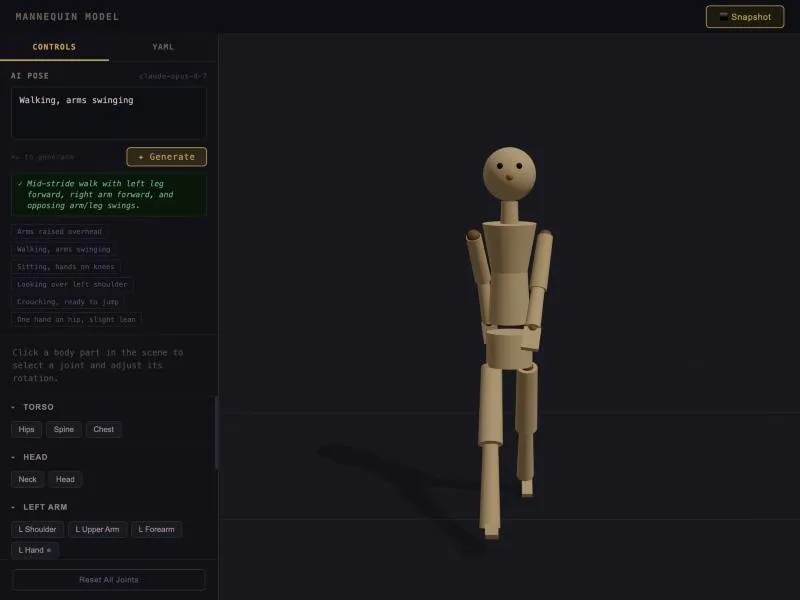
Mannequin Model is a 3D artist’s wooden mannequin that runs in your browser. You can pose it by hand, one joint at a time, or describe the pose in plain words, like “walking, arms swinging,” and have Claude set the joints for you. Each of its 18 joints is limited to a range a real body could reach, so the poses stay believable. When you’re done, you can copy the pose as YAML or save a picture of it.
Why I built it
Image generators often get bodies wrong. I built the mannequin so a pose can ground image generation: pose it first, then use the pose to guide a diffusion model, so the people in the generated images come out with accurate bodies. It connects to Body Talk, where the body is the subject.
Where it stands
The posing tool works, and the code is public on GitHub. The step that hands a pose to an image model is not part of the demo, so the demo does not generate images.
Try it
The posing tool runs in your browser, and you can dial in any of the 18 joints by hand. The text-to-pose generator needs an Anthropic API key, so it is turned off on the hosted demo.